
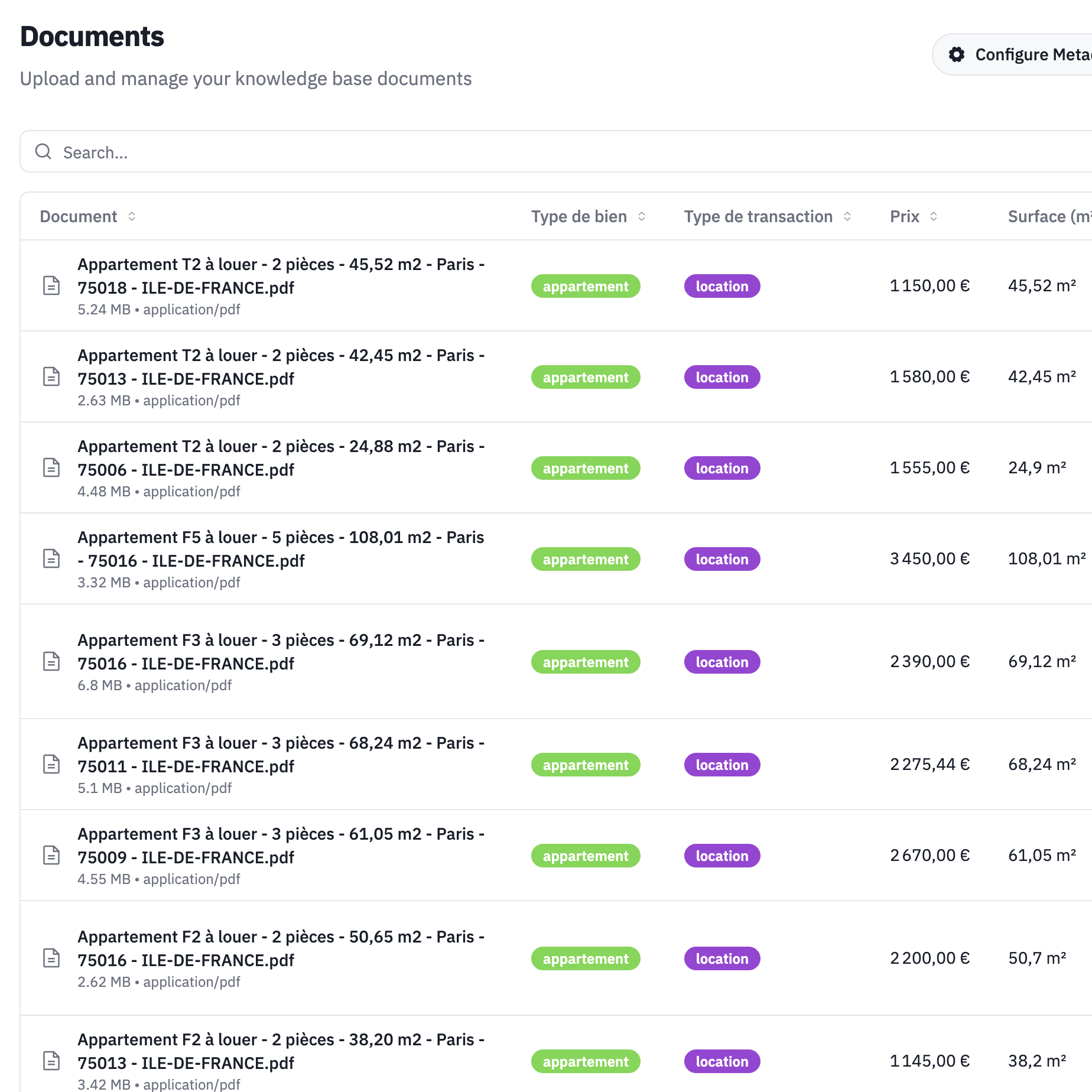
Advanced document retrieval: Knowledge at your agent's fingertips
We're thrilled to introduce Advanced Document Retrieval, a game-changing feature that transforms how your AI agents access and use your business knowledge.
The problem we're solving
Every business has information spread across product catalogs, policy documents, FAQs, pricing sheets, and technical documentation. Until now, AI agents had limited, static knowledge that required retraining whenever information changed—and it was impossible to include thousands of pages of documentation.
Not anymore.
What is advanced document retrieval?
Think of it as giving your AI agent a perfect memory and instant access to your entire knowledge base. When a customer asks a question, your agent understands it in natural language, searches your documents in milliseconds, finds relevant information with precision, and provides accurate responses without hallucination.
How it works
1. Upload your documents
Add any document format to your HeyUp knowledge base—PDFs, Word files, text files, Markdown, Excel spreadsheets, PowerPoint presentations, or web pages.
2. Automatic processing
Our system extracts and structures the content, creates semantic embeddings, builds a searchable index, and maintains version control.
3. Real-time retrieval
During calls, your agent identifies information needs, queries the knowledge base, retrieves relevant sections, and cites sources when appropriate.
Practical examples
Product inquiries
Customer: "Do you have that sofa in dark blue?"
Agent: Searches product catalog in real-time
"Yes, the Comfort Cloud sofa is available in navy blue. It's in stock and can be delivered within 5-7 business days. Would you like me to reserve one for you?"
Technical support
Customer: "How do I reset my device?"
Agent: Retrieves step-by-step guide
"I can help you reset your device. First, locate the small reset button on the back panel near the power port. Using a paperclip, press and hold it for 10 seconds until the LED blinks red. Then release and wait 30 seconds for the device to restart. Are you ready to try this?"
Policy questions
Customer: "What's your return policy for online orders?"
Agent: References latest policy document
"For online orders, you have 30 days to return items in their original condition. Shipping is free for returns over €50. You can initiate a return through your account dashboard or I can help you start the process now."
Advanced capabilities
Multi-document search
Your agent can search across multiple documents simultaneously to compare specifications, cross-reference policies, and provide comprehensive answers.
Contextual understanding
The system understands synonyms, industry jargon, and customer intent to deliver relevant results every time.
Source attribution
For transparency, agents can cite specific documents with page numbers and offer to send detailed information.
Version control
Update documents anytime—changes take effect immediately while previous versions are archived with a full audit trail.
Use cases by industry
Healthcare
Medical procedure information, insurance coverage details, medication instructions, and appointment policies.
Legal
Service descriptions, fee structures, case types, and consultation procedures.
E-commerce
Product specifications, shipping information, return policies, and warranty details.
Real estate
Property details, neighborhood information, financing options, and legal requirements.
Hospitality
Room amenities, local attractions, dining options, and event information.
Security and privacy
Your documents are protected with military-grade encryption (at rest and in transit) in EU data centers, role-based access control with audit logs, and full GDPR compliance with data residency options.
Performance metrics
Early users report 95% accuracy in information retrieval with <200ms average search time, 80% reduction in "I don't know" responses, and 60% fewer escalations to humans.
Getting started
1. Prepare your documents
Gather your key documents, identify frequently referenced materials, update any outdated information, and organize by category.
2. Upload to HeyUp
In your dashboard, navigate to Knowledge Base, upload documents, add descriptions and tags, and set access permissions.
3. Configure retrieval
Customize how your agent uses documents by setting confidence thresholds, defining citation preferences, and testing with sample questions.
4. Monitor and improve
Track performance metrics, review retrieval accuracy, identify knowledge gaps, and update documents as needed.
Best practices
Document organization
Use clear, descriptive filenames, break large documents into sections, and add metadata and tags for better searchability.
Content quality
Write in plain language using consistent terminology, and keep information current by removing redundancy.
Testing
Test with real customer questions, verify accuracy of responses, and update based on feedback.
Pricing
Advanced document retrieval is included in:
- Max Plan: Up to 10,000 pages
- Enterprise Plan: Unlimited pages
Pro plan users can add it for €99/month.
What's next
We're working on image understanding to extract information from diagrams and charts, multi-language documents for searching across different languages, structured data for real-time database integration, and learning from conversations to automatically identify knowledge gaps.
Start using it today
Advanced Document Retrieval is available now. Log into your HeyUp dashboard to upload your first documents, or contact our team for a guided setup session.
Transform your AI agent from a basic responder into a knowledgeable expert that rivals your best team members.
Need help setting up document retrieval? Reach out to support@heyup.ai